
Overview
AutoIt v3 is a freeware BASIC-like scripting language designed for automating the Windows GUI and general scripting. It uses a combination of simulated keystrokes, mouse movement and window/control manipulation in order to automate tasks in a way not possible or reliable with other languages (e.g. VBScript and SendKeys). AutoIt is also very small, self-contained and will run on all versions of Windows out-of-the-box with no annoying “runtimes” required!
AutoIt was initially designed for PC “roll out” situations to reliably automate and configure thousands of PCs. Over time it has become a powerful language that supports complex expressions, user functions, loops and everything else that veteran scripters would expect.
- Easy to learn BASIC-like syntax
- Simulate keystrokes and mouse movements
- Manipulate windows and processes
- Interact with all standard windows controls
- Scripts can be compiled into standalone executables
- Create Graphical User Interfaces (GUIs)
- COM support
- Regular expressions
- Directly call external DLL and Windows API functions
- Scriptable RunAs functions
- Detailed helpfile and large community-based support forums
- Compatible with Windows XP / 2003 / Vista / 2008 / Windows 7 / 2008 R2 / Windows 8 / 2012 R2 / Windows 10
- Unicode and x64 support
- Digitally signed for peace of mind
- Works with Windows Vista’s User Account Control (UAC)
AutoIt has been designed to be as small as possible and stand-alone with no external .dll files or registry entries required making it safe to use on Servers. Scripts can be compiled into stand-alone executables with Aut2Exe.
Also supplied is a combined COM and DLL version of AutoIt called AutoItX that allows you to add the unique features of AutoIt to your own favourite scripting or programming languages!
Best of all, AutoIt continues to be FREE – but if you want to support the time, money and effort spent on the project and web hosting then you may donate.
Download
Take me to the downloads page!

Features
Here are some of the unique features of AutoIt.
Basic-like Syntax and Rich Function Set
AutoIt has a BASIC-like syntax which means that most people who have ever written a script or used a high-level language should be able to pick it up easily.
Although it started life as a simple automation tool, AutoIt now has functions and features that allow it to be used as a general purpose scripting language (with awesome automation as well of course!). Language features include:
- The usual high-level elements for functions, loops and expression parsing
- A staggering amount of string handling functions and a Perl compatible regular expression engine (using the PCRE library).
- COM support
- Call Win32 and third-party DLL APIs
Built-in Editor with Syntax Highlighting
AutoIt comes with a customised “lite” version of SciTe that makes editing scripts easy. Users can also download a complete version of SciTe that includes additional tools to make things even easier.
Standalone and Small
AutoIt is a very small and standalone application with no reliance on massive runtimes like .NET or VB. All you need to run AutoIt scripts are the main AutoIt executable (AutoIt3.exe) and the script. Scripts can also be encoded into standalone executables with the built-in script compiler Aut2Exe.
International and 64-bit Support
AutoIt is fully Unicode aware and also includes x64 versions of all the main components! How many other free scripting languages can you say that about?
Key and Mouse Simulation
Much time has been spent optimizing the keystroke and mouse simulation functions to be as accurate as possible on all versions of Windows. All the mouse and keyboard routines are highly configurable both in terms of simulation “speed” and functionality.
Window and Control Management
You can expect to move, hide, show, resize, activate, close and pretty much do what you want with windows. Windows can be referenced by title, text on the window, size, position, class and even internal Win32 API handles.
Directly get information on and interact with edit boxes, check boxes, list boxes, combos, buttons, status bars without the risk of keystrokes getting lost. Even work with controls in windows that aren’t active!
Graphical User Interfaces (GUIs)
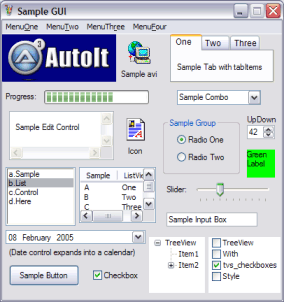
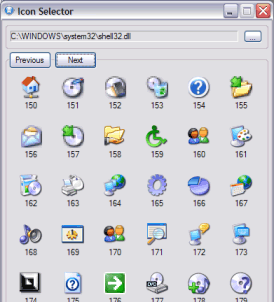
AutoIt v3 will also allow you to create some complex GUIs – just like those below!
And much, much more.
You’ll probably want to go to the downloads page right now…